The best apps to block Reels and Shorts on iPhone in 2026
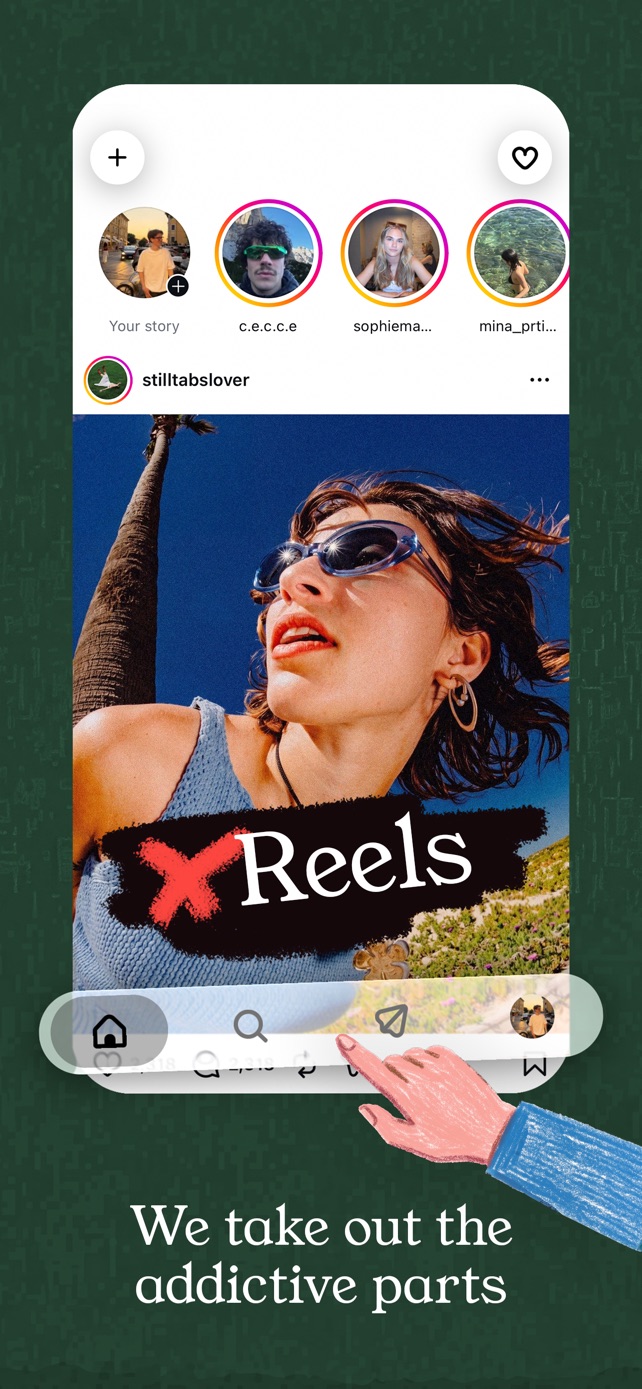
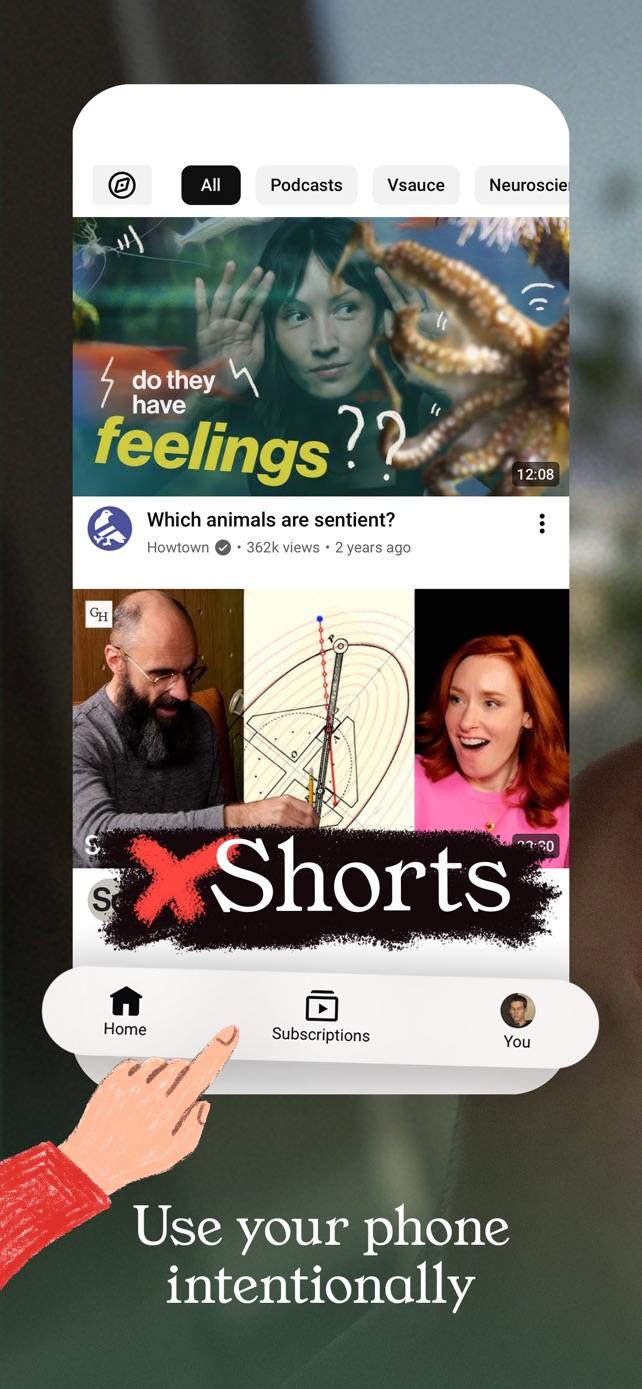
The best app to block Reels and Shorts on iPhone is StillTabs: it's completely free with nothing to buy, removes Reels, Shorts, Explore and "For you" feeds while keeping your messages, and its App Store label shows no tracking. It covers Instagram, YouTube, Facebook, X and Reddit, puts Home Screen icons named after each platform on your phone, and needs no screen broadcast, no Safari setup and no Screen Time locks. We compared it with 18 alternatives below.
Our picks
| Best for | App | Price | The catch |
|---|---|---|---|
| Best overall, and best free | StillTabs | Free. No Pro tier, no trial, no ads | iPhone only; no TikTok |
| Safari only, free | Nope | Free | Only works on the Instagram and YouTube websites in Safari |
| Blocking inside the official apps | Scroll Less | Premium from $4.99, up to $49.99 lifetime | Needs an iOS screen broadcast running so it can see your screen |
| Locking whole apps | one sec | Free download; pro up to $99.99 lifetime | Can't remove Reels and keep DMs: it pauses the whole app |
Why StillTabs is the best choice
- Nothing to pay for, ever. No subscription, no trial, no "Pro". Most apps here are free to download and then sell the full product; StillTabs has no in-app purchases at all, so no feature is held back and nothing nags you to upgrade.
- Your habit still works. StillTabs adds Home Screen icons named Instagram, YouTube, Facebook, X and Reddit. Your thumb goes where it always did, and the app opens without Reels. How it works.
- Nothing on your phone gets locked or watched. No Screen Time access, no device management, no screen broadcast, no Safari extension permissions. Your other apps stay exactly as they are.
- It keeps what you came for. DMs, stories, search, subscriptions and the people you follow stay; Reels, Shorts, Explore, suggested posts and autoplay go.
- It feels like the real app. StillTabs draws Instagram's toolbar natively and keeps each tab loaded, so switching is instant, and you get around with edge swipes instead of a floating button over the page. What that looks like.
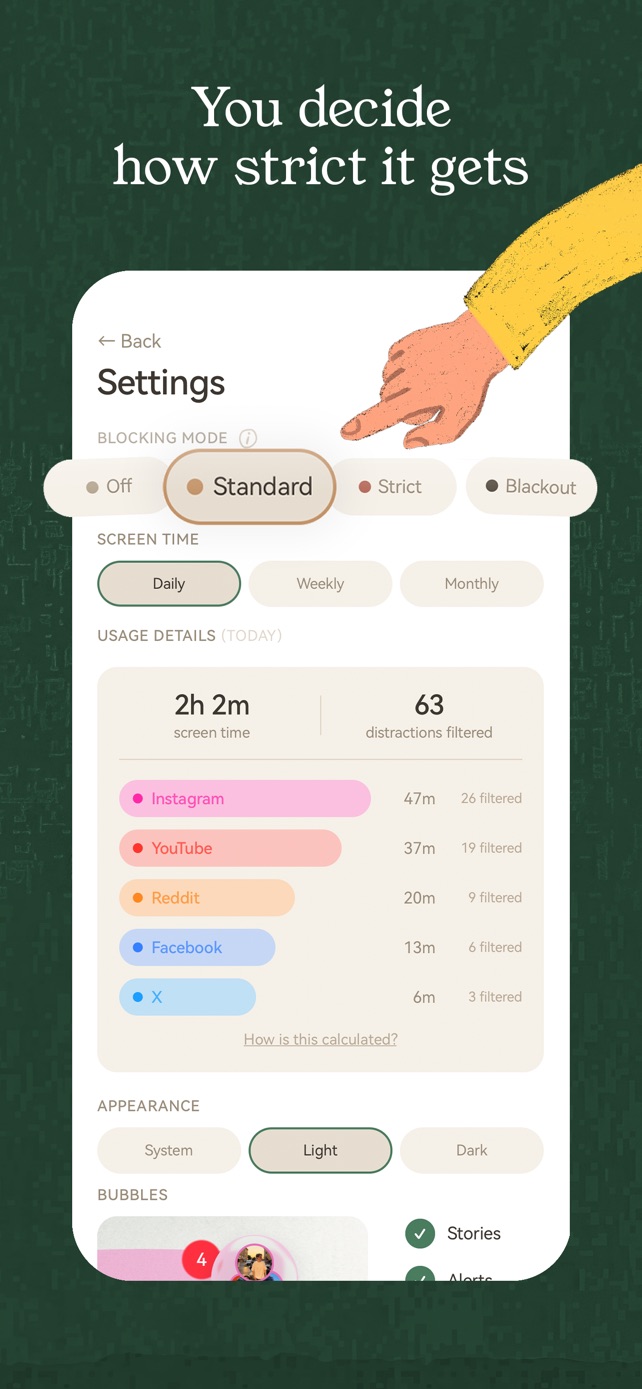
- You choose how strict. Four modes (Off, Standard, Strict, Blackout), switchable any time.
- Five platforms, five accounts each. Instagram, YouTube, Facebook, X and Reddit, with separate sign-ins for up to five accounts per platform.
- No tracking. App Store label: "Data Not Linked to You". Analytics are off unless you turn them on.
Every app, compared
| App | How it works | Price (US App Store) | App Privacy label |
|---|---|---|---|
| StillTabs | Own app, platforms inside it; Home Screen icons | Free, no in-app purchases | Data Not Linked to You |
| FeedOff | Own app, platforms inside it; optional Screen Time shield | Free, no in-app purchases | Data Not Collected |
| Nope | Safari extension | Free, no in-app purchases | Data Not Collected |
| Slowth | Safari extension | Free; optional tips | Data Not Collected |
| #blockit | Safari extension | 7-day trial, then $0.99 a month or $3.99 a year | Data Not Collected |
| ScrollGuard | Safari extension (iPhone) | Free download; Pro from $3.99 | Data Not Linked to You |
| Scroll Less | Screen broadcast inside the official apps | Premium $4.99 to $49.99 | Data Not Linked to You |
| minulo | Own app, platforms inside it | Freemium: Pro $9.99 a month or $39.99 a year (basic hiding included free) | Data Not Linked to You |
| Fluid Friction | Own app; feed blockers plus scroll friction | Blockers free; $4.99 a month or $39.99 a year | Data Not Linked to You |
| UNDOOMED | Own app, platforms inside it | Plus and Pro from $1.99 a month, $29.99 lifetime | Data Not Linked to You |
| LoomWeb | Own browser | Pro $2.99 a month to $49.99 lifetime | Data Not Linked to You |
| snowscroll | Own browser | Pro $9.99 to $69.99 | Data Not Linked to You |
| Sociano | Own browser plus app blocker | Pro $9.99 a week or $39.99 a year | Data Linked to You |
| SocialLite | Own app; also blocks the native apps | Pro up to $17.99 a month or $47.90 a year | Data Used to Track You |
| Dull | Own app with time limits | $3.99 a month to $79.99 lifetime | Data Used to Track You |
| Opal | Blocks whole apps | $4.99 a week to $99.99 a year | Data Used to Track You |
| one sec | Pause before opening whole apps | Pro $6.99 a month to $99.99 lifetime | Data Not Linked to You |
| ScreenZen | Pauses and limits for apps | Free (optional tips) | Data Not Linked to You |
| iPhone Screen Time | Time limits for whole apps | Built in | Apple |
The four ways to block Reels on iPhone
iPhone apps can't change how another app looks, so every Reels blocker uses one of four workarounds. The kind matters more than the brand:
- Its own app, with the platforms inside (StillTabs, FeedOff, minulo, UNDOOMED, SocialLite, Dull). Reels are removed before you see them and messages keep working. StillTabs has no paid tier at all.
- Safari extensions (Nope, Slowth, #blockit, ScrollGuard). They work only on the websites in Safari, and you switch them on per site in Settings. Fine if you already use Instagram in Safari.
- Screen broadcast (Scroll Less). iOS asks you to start a broadcast, the same system feature used for screen recording, so the app can detect Reels on your screen inside the official apps. The broadcast has to keep running; Scroll Less says detection stays on your phone.
- Whole-app blockers (Opal, one sec, ScreenZen, Screen Time). They lock or delay Instagram as a whole, so your messages are locked along with the Reels.
Where the paid apps fall short
Most Reels blockers are free to download and then sell the real product. SocialLite lists Pro up to $17.99 a month and its terms say refunds are generally not given; Opal bills weekly from $4.99; Sociano lists $9.99 a week. Three of them, SocialLite, Dull and Opal, carry Apple's "Data Used to Track You" label, and Sociano's says data is linked to you. Their websites tell the same story: SocialLite's and Opal's load Meta's advertising pixel for every visitor with no cookie banner, while stilltabs.com loads no trackers at all (we checked 17 sites). More in the hidden costs of "free" Reels blockers.
StillTabs does not track you. Its App Store privacy label is "Data Not Linked to You", with nothing under "Data Used to Track You" or "Data Linked to You". Usage analytics are off by default and only start if you switch them on; even then they are tied to a random ID on your phone, never to your name or accounts, and never include what you watch, search or write. There are no ads and nothing is sold. Pages load straight from each platform: StillTabs runs no proxy, so it never sees your passwords, messages or what you browse. The privacy policy lists every event in full.
- The free SocialLite alternative: StillTabs
Looking for a SocialLite alternative? StillTabs removes Reels and Shorts for free, with no subscription, no tracking label, and without locking your other apps. - StillTabs vs SocialLite
StillTabs vs SocialLite compared: both remove Reels and Shorts on iPhone. StillTabs is free with no tracking label; SocialLite charges up to $17.99 a month. - StillTabs vs Dull
StillTabs vs Dull: both hide Reels and Shorts on iPhone. StillTabs is free with no tracking; Dull sells plans up to $79.99 and its label lists data used to track you. - StillTabs vs Opal: removing Reels vs blocking the whole app
Opal blocks whole apps on a schedule; StillTabs removes just Reels and Shorts so you keep DMs and friends. StillTabs is free; Opal plans reach $99.99 a year. - StillTabs vs one sec
one sec adds a pause before you open an app; StillTabs removes Reels and Shorts once you are in. StillTabs is free; one sec pro is $6.99 a month. - Can iPhone Screen Time block Reels or Shorts?
iPhone Screen Time can limit or block whole apps, but it can't remove Reels from Instagram or Shorts from YouTube. Here is what it can do, and what StillTabs adds. - Is there an Unhook for iPhone?
Unhook is a desktop browser extension with no iPhone app. StillTabs does the same on iPhone: YouTube without Shorts, recommendations or autoplay previews, for free. - What "free" Reels blockers and screen-time apps really cost
Most apps that block Reels and Shorts are free to download and then charge weekly, monthly or yearly, track you, and limit refunds in their terms. Here is what each one says, in its own words. - StillTabs vs Clearspace
Clearspace adds friction before you open an app and charges up to $59.99 a year; its label lists Health & Fitness and Contacts as linked to you. StillTabs removes Reels for free with no tracking. - StillTabs vs Jomo
Jomo blocks whole apps and websites and sells plans up to $99.99 lifetime; its label lists User Content as data used to track you. StillTabs removes just the Reels, for free. - StillTabs vs Freedom
Freedom blocks apps and sites and costs up to $199; its label lists Identifiers as used to track you, and its own help says blocks could be bypassed before iOS 26.4. StillTabs is free. - StillTabs vs AppBlock
AppBlock says itself it can't block Reels or Shorts on iPhone, only whole apps. StillTabs removes Reels and Shorts and keeps the rest, for free, with no tracking. - StillTabs vs minulo
minulo is freemium: Pro is $9.99 a month or $39.99 a year, its privacy policy is only in Japanese and it has no terms of its own. StillTabs is completely free, with nothing to buy. - StillTabs vs Stillfeed
StillTabs and Stillfeed are different apps. StillTabs is free with no tracking; Stillfeed bills $2.99 a week and its label links Browsing History and Coarse Location to you. - StillTabs vs SocialFocus
SocialFocus costs $4.99 upfront plus a subscription, and only works in Safari. StillTabs is free and gives each platform an app-like home with no Reels or Shorts. - StillTabs vs ScrollGuard
ScrollGuard hides Reels on websites in Safari and sells Pro from $3.99; deleting it doesn't cancel the subscription. StillTabs is a free app for five platforms. - StillTabs vs Brick
Brick is a $59–$129 device that locks apps until you tap it. StillTabs is a free app that removes Reels and Shorts and keeps messages, with nothing to buy or lose. - StillTabs vs BlockSite
BlockSite blocks whole apps and sites, sells plans up to $19.99 a month, and its policy discloses browsing activity to affiliates for "market intelligence". StillTabs is free and never sees your browsing. - StillTabs vs SHIFT
SHIFT blocks whole apps from a computer for $149 to $399 and puts your iPhone under device management. StillTabs is free, removes just Reels and Shorts, and keeps your DMs. - Which Reels blocker websites track you? We checked 17
We opened the websites of 17 Reels and screen-time blockers from the Netherlands without accepting anything and recorded every tracker that loaded. SocialLite and Opal load advertising trackers with no cookie banner; stilltabs.com loads none.
Common questions
What is the best free app to block Reels and Shorts on iPhone?
StillTabs. It removes Instagram Reels, YouTube Shorts, the Facebook Reels tab (beta) and the X "For you" tab, keeps your messages, and has no in-app purchases at all. Nope and Slowth are also free, but only work in Safari.
Can an app remove Reels inside the real Instagram app on iPhone?
Not directly: iOS doesn't let one app change another. Scroll Less gets closest by watching your screen through an iOS screen broadcast and blocking when Reels appear. StillTabs instead opens Instagram inside its own app without Reels, and its Home Screen icon named Instagram means you tap the same spot as before.
Which app blocks Reels but keeps Instagram DMs?
StillTabs keeps DMs, stories, search and posts from people you follow, and removes Reels, Explore and suggested posts. Whole-app blockers like Opal, one sec and Screen Time can't do this: they lock the DMs along with the Reels.
Do Reels blockers get my Instagram password?
With StillTabs, no. You sign in on Instagram's own page, pages load straight from Instagram, and StillTabs runs no server in between, so your password and messages never pass through it.
Is StillTabs really free?
Yes. There is no subscription, no trial, no Pro version and no ads. The App Store shows no in-app purchases for StillTabs.
Does it block YouTube Shorts too?
Yes. Standard mode removes the Shorts tab, the Shorts shelves on Home and autoplaying previews; Strict also removes Shorts from search and channels and opens YouTube on your subscriptions.
Is there a Reels blocker for Android?
StillTabs is iPhone only for now. ScrollGuard and AppBlock offer Android apps.
StillTabs is free on the App Store, for iPhone. No subscription, no in-app purchases, no account. iOS 16 or later.
Sources
- StillTabs on the App Store (price, privacy label): https://apps.apple.com/us/app/stilltabs-block-reels-shorts/id6761367777
- StillTabs privacy policy: https://stilltabs.com/privacy
- FeedOff on the App Store: https://apps.apple.com/us/app/id6815511380
- Nope on the App Store: https://apps.apple.com/us/app/id6768192042
- Slowth on the App Store: https://apps.apple.com/us/app/id6764140763
- #blockit on the App Store: https://apps.apple.com/us/app/id1492879257
- ScrollGuard on the App Store: https://apps.apple.com/us/app/id6754183872
- Scroll Less on the App Store: https://apps.apple.com/us/app/id6741134096
- Scroll Less: how the Blocker works (screen broadcast): https://scroll-less.com/
- minulo on the App Store: https://apps.apple.com/us/app/id6809352229
- Fluid Friction on the App Store: https://apps.apple.com/us/app/id6782510849
- UNDOOMED on the App Store: https://apps.apple.com/us/app/id6751837079
- LoomWeb on the App Store: https://apps.apple.com/us/app/id6754727620
- snowscroll on the App Store: https://apps.apple.com/us/app/id6778488660
- Sociano on the App Store: https://apps.apple.com/us/app/id6760568406
- SocialLite on the App Store (in-app purchases, privacy label): https://apps.apple.com/us/app/id6757661674
- SocialLite terms (renewal, refunds): https://sociallite.app/terms/
- Dull on the App Store: https://apps.apple.com/us/app/id6759723829
- Opal on the App Store: https://apps.apple.com/us/app/id1497465230
- one sec on the App Store: https://apps.apple.com/us/app/id1532875441
- ScreenZen on the App Store: https://apps.apple.com/us/app/id1541027222
- Apple: Screen Time schedules on iPhone (iOS 26): https://support.apple.com/guide/iphone/set-schedules-with-screen-time-iphb0c7313c9/26/ios/26